Friday, February 1, 2013

How to add Slider or Trackbar to a cvWindow

0 comments
    You might have seen my previous post regarding the HSV values extraction. That code used Sliders to vary the value of the parameter passed to the thresholding algorithm. In this post, we are going to learn ahow to add a Slider or Trackbar to a cvWindow.

the function below will create and add a trackbar to the window "Output"
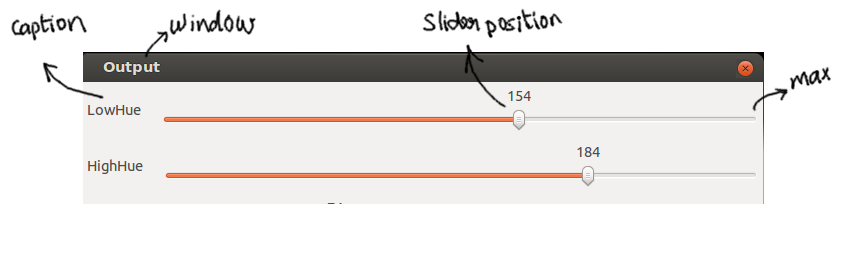
  cvCreateTrackbar("LowHue", "Output", &lowHue, max, onLowHue);

you see here five arguments to the function.

"LowHue" - it is a string, used as caption on the cvWindow above the Trackbar. something like a name for the trackbar.


"Output" - name of the window, which must be created using cvNamedWindow("Output", CV_WINDOW_NORMAL ) before attaching a trackbar to it.
 cvNamedWindow("Output",CV_WINDOW_NORMAL)

&lowHue - it is a variable, corresponding to the slider position.
 int lowHue = 10;

max - maximum value for the slider. the value corresponding to slider postion when it is at the rightmost end.
 int max = 255;

onLowHue - it is a function pointer, which will be called when, there is a change in slider position due to user interaction.

void onLowHue (int value )

     lowHue = value;
 }

voila!!!
Read more ►

HSV trainer

1 comments
    This code snippet extracts the lower and higher bound HSV values for the object of interest.

Code Listing

#include<stdio.h>
#include<cv.h>
#include<highgui.h>

int max = 255;

int lowHue = 10 ;
int lowSat = 0 ;
int lowVal = 0 ;

int highHue = 100 ;
int highSat = 255 ;
int highVal = 255 ;

void onLowHue ( int value ) { lowHue = value ; }
void onLowSat ( int value ) { lowSat = value ; }
void onLowVal ( int value ) { lowVal = value ; }

void onHighHue ( int value ) { highHue = value ; }
void onHighSat ( int value ) {  highSat = value ; }
void onHighVal ( int value ) { highVal = value ; }

IplImage* hsv_from_rgb(IplImage* _src);
IplImage* hsv_threshold ( IplImage* _hsv_src,
     CvScalar _min,
     CvScalar _max );

void cvCreateShowWindow(char* name, IplImage *src)
{
 cvNamedWindow(name,CV_WINDOW_NORMAL);
 cvShowImage(name, src);
 
}

IplImage* resize_640x480(IplImage* _src)
{
    IplImage* res = cvCreateImage( cvSize(640,480) ,
                                   _src->depth, 
                                   _src->nChannels
                                  );   
    cvResize ( _src, res, CV_INTER_LINEAR );
 return res;
}

int main ( int  argc, char* argv[] )
{
 if ( argc < 2 ) {
     printf ("Error: no input image found\n" ) ;
     exit (1) ;
   }
 cvStartWindowThread();

   IplImage* src = cvLoadImage(argv[1], CV_LOAD_IMAGE_UNCHANGED);
   cvCreateShowWindow("src", src);
   cvWaitKey(0);
   IplImage* cir = cvCloneImage (src) ;
   //IplImage* _src = cvCreateImage ( cvGetSize(src), IPL_DEPTH_8U, 1 ) ;
   //cvCvtColor (src, _src, CV_BGR2GRAY) ;
   IplImage* _src = resize_640x480 (src);
   //cvSmooth ( _src, _src, CV_GAUSSIAN, 15, 0, 0, 0);

   cvCreateShowWindow(" input", _src);

  cvCreateShowWindow("Output",_src  );

  cvCreateTrackbar("LowHue", "Output", &lowHue, max, onLowHue);
  cvCreateTrackbar("HighHue", "Output", &highHue, max, onHighHue);

  cvCreateTrackbar("LowSat", "Output", &lowSat, max, onLowSat);
  cvCreateTrackbar("HighSat", "Output", &highSat, max, onHighSat);

  cvCreateTrackbar("LowVal", "Output", &lowVal, max, onLowVal);
  cvCreateTrackbar("HighVal", "Output", &highVal, max, onHighVal);

  CvMemStorage* storage = cvCreateMemStorage(0);
  IplImage* hsved = hsv_from_rgb ( _src );
  IplImage* res ;
 while ( 1 )
 {
   res = hsv_threshold( hsved, 
                        cvScalar( lowHue, lowSat, lowVal, 0),
                        cvScalar( highHue, highSat, highVal, 255) );
   cvWaitKey(30);
   cvShowImage("Output", res );
 
 } // End of while loop
  
  cvCreateShowWindow("res", res);
  cvWaitKey(0);
  cvDestroyWindow("res");
  cvDestroyAllWindows();
}  

IplImage* hsv_from_rgb(IplImage* _src)
{
  IplImage* img = cvCloneImage ( _src ) ;
  cvCvtColor ( _src, img, CV_BGR2HSV );
  return img;
}

IplImage* hsv_threshold ( IplImage* _hsv_src,
     CvScalar _min,
     CvScalar _max )
{
    IplImage* thresholded = cvCreateImage(cvGetSize( _hsv_src ), 8, 1 );
    cvInRangeS( _hsv_src, _min, _max, thresholded );  
    return thresholded;  
}


    Run the program with any input image. Adjust the slider so that the object of interest is show white. Note the values. Thats it. You are done.
 
Read more ►
 

Copyright © Project Athena Design by O Pregador | Blogger Theme by Blogger Template de luxo | Powered by Blogger